Procedural terrain generation in Unity
Editor tool that generates terrains with Midpoint Displacement, Diamond-Square and fractal noise, erodes and populates them, and renders them with triplanar, reactive snow and water shaders.
- Node
- procedural-terrain
- Runs on
- GPU
- Stack
-
- Unity
- C#
- HLSL
- Shader Graph
Generating a terrain from scratch with the editor tool: hybrid multifractal FBM, thermal erosion and object spawning, ending on the shaded scene.
Context
Procedural terrain generation builds a landscape from an algorithm instead of sculpting it by hand. A heightmap is filled by a subdivision or noise function, reshaped by simulated erosion, and then dressed with objects and materials. Changing a seed or a parameter produces a new terrain in seconds, which is why these techniques sit under most open-world and simulation pipelines.
This project covers that whole chain inside Unity: a custom editor tool that generates, erodes and populates terrains, and a set of shaders that render them with triplanar texturing, snow that reacts to the scene, and animated water. Everything runs in a playable scene where the terrain can be explored and hit.
Overview
The project is organised as a pipeline of five stages:
- Generate a heightmap with Midpoint Displacement, Diamond-Square or fractal Brownian motion.
- Erode it with thermal erosion.
- Populate it with object instances.
- Shade it with triplanar mapping, orientation-based snow and a water surface.
- Interact with it from a first-person controller that changes the amount of snow and fires projectiles at it.
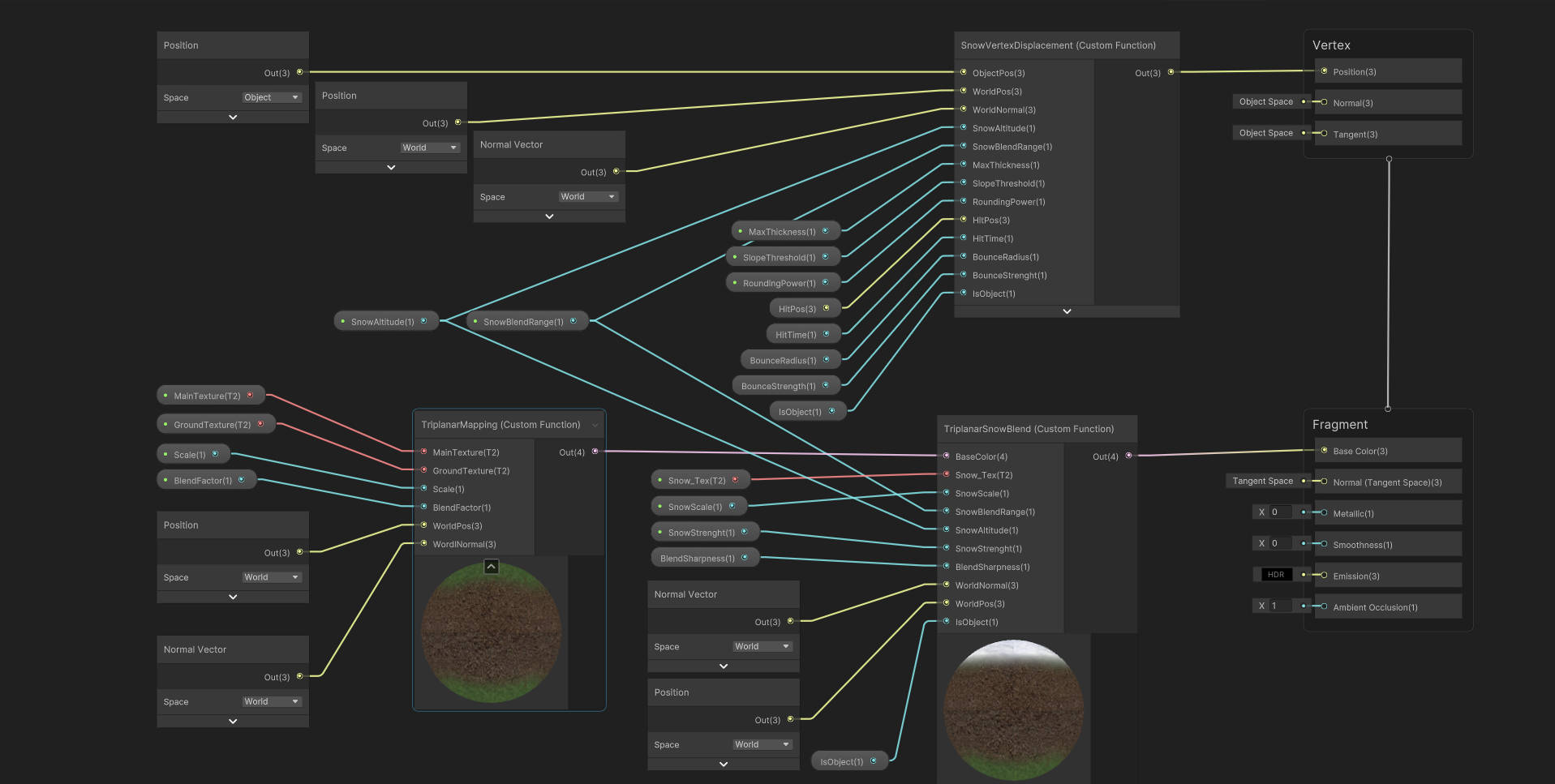
Generation, erosion and spawning live in one editor tool in the Unity inspector. The terrain shaders are hand-written HLSL inside Custom Function nodes (TriplanarMapping, TriplanarSnowBlend, SnowVertexDisplacement) wired together in Shader Graph, while the water is built entirely from Shader Graph nodes.
The terrain editor tool
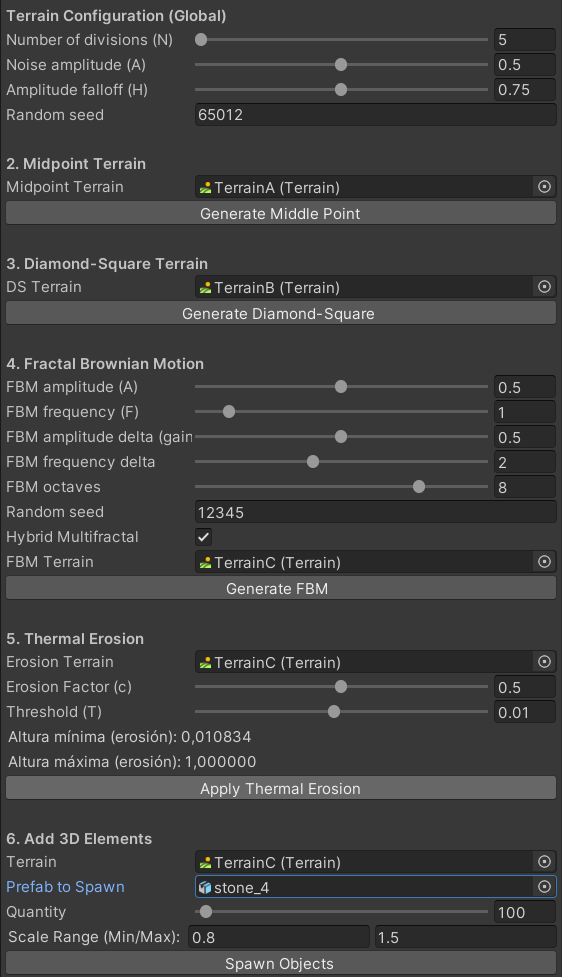
All generation happens from a single panel in the Unity inspector, split into six blocks from top to bottom:
- Terrain Configuration (Global): the number of divisions
N, the noise amplitudeA, the amplitude falloffHand the seed shared by the subdivision algorithms. - Midpoint Terrain: a target terrain and a button that generates it with Midpoint Displacement.
- Diamond-Square Terrain: the same for Diamond-Square.
- Fractal Brownian Motion: amplitude, frequency, gain, frequency delta, octaves, its own seed and the Hybrid Multifractal toggle.
- Thermal Erosion: a target terrain, the erosion factor
c, the thresholdTand the resulting height range. - Add 3D Elements: a target terrain, the prefab, the number of instances and a scale range.
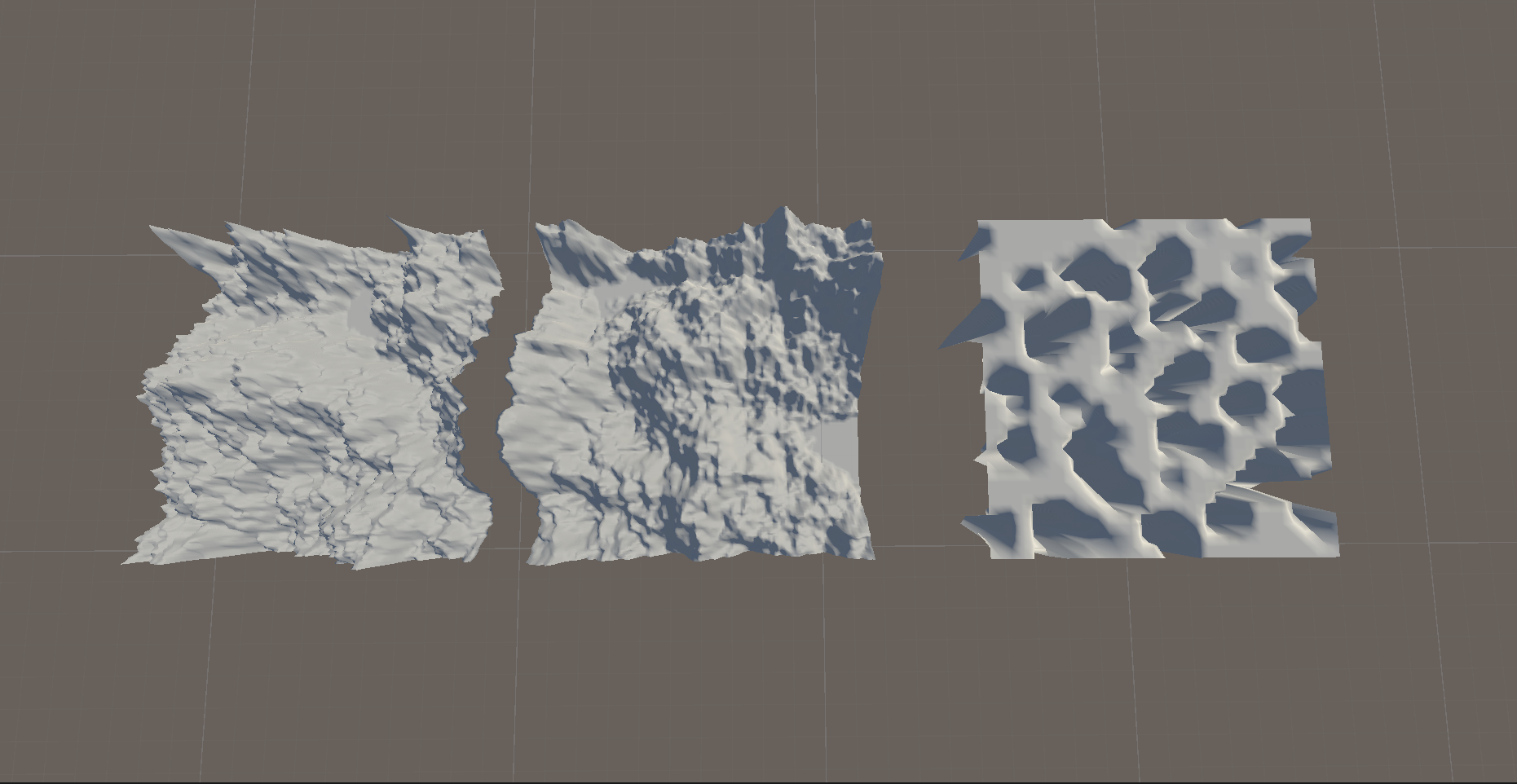
Each technique points at its own Terrain, so the algorithms can be compared side by side on separate terrains.
Midpoint Displacement and Diamond-Square
Both algorithms build the heightmap by recursive subdivision. They start from the corners of the grid, fill in new points from the average of their neighbours plus a random offset, and repeat on ever smaller cells. N sets how many subdivision levels run, A sets the size of the first offsets, and H reduces that amplitude at every level, which decides how rough or smooth the result looks.
Midpoint Displacement fills the midpoints along the edges of each cell. Diamond-Square alternates two steps: the diamond step sets the centre of each square from its four corners, and the square step sets the edge midpoints from the surrounding diamond. That alternation spreads the random offsets more evenly and reduces the axis-aligned creases that plain midpoint subdivision tends to leave.
Fractal Brownian motion and hybrid multifractal
Fractal Brownian motion sums several layers, or octaves, of noise. Each octave multiplies the frequency by the frequency delta and the amplitude by the amplitude delta, so every layer adds finer and fainter detail. The capture uses 8 octaves, a base amplitude of 0.5 and frequency of 1, an amplitude delta (gain) of 0.5 and a frequency delta of 2.
With Hybrid Multifractal enabled, each octave is weighted by the value of the ones before it. Low, smooth areas stay smooth and detail concentrates on higher ground, which gives valleys and ridges a different character instead of a uniformly noisy surface.
Changing octaves, gain and frequency in the inspector and regenerating the FBM terrain.
Thermal erosion
Thermal erosion simulates material sliding down slopes that are too steep to hold it. For each cell, the height difference with its lower neighbours is compared to a threshold T; where it is exceeded, a fraction c of the excess moves downhill. Repeating the pass softens sharp peaks and piles material at the foot of slopes. The capture uses c = 0.5 and T = 0.01, and the tool reports the minimum and maximum height of the terrain after erosion (0.0108 and 1.0).
The same FBM terrain before and after applying thermal erosion.
Populating the terrain
The last section of the tool scatters instances of a prefab over a target terrain. It takes the prefab, the number of instances and a minimum and maximum scale, so each object gets its own size within that range (stone_4, 100 instances and a 0.8 to 1.5 scale range in the capture). [PENDING: how positions and rotations are chosen, for example random over the surface or aligned to the terrain normal]
Spawning object instances over the eroded terrain from the editor tool.
Triplanar mapping
Triplanar mapping is a texturing technique that solves the classic problem of applying textures to terrains with steep slopes. With normal UVs, the texture stretches on vertical areas because the coordinates are meant for horizontal surfaces. Triplanar projects the texture from three orthogonal directions (X, Y, Z) and blends the results based on the surface normal, eliminating stretching regardless of orientation. It’s the foundation of almost any modern game terrain with cliffs or non-flat geometry.
The triplanar shader samples the same texture three times, once per each orthogonal plane (XY, XZ, YZ), using world coordinates as UVs. It then blends the three samples using the surface normal as weight: the axis whose normal component is largest dominates the result.
On a horizontal surface (normal pointing up), the XZ projection dominates and you see the texture from the Y axis. On a vertical cliff (normal pointing sideways), the lateral projection wins and the texture is projected correctly, without stretching. The transition between projections is continuous because the blending uses the squared components of the normal, which gives a smooth weight with no discontinuities.
Terrain slope with standard UV texturing, showing the stretched texture.
The same slope with triplanar mapping, clean across all geometry.
Snow accumulation by surface orientation
Snow doesn’t cover the entire terrain uniformly. In reality it accumulates on horizontal surfaces and barely appears on vertical ones. The shader replicates this by using the Y component of the normal as a mask: surfaces with a normal pointing upward receive snow, sideways surfaces don’t.
The result is that snow appears on peaks and flatlands, respects cliffs by leaving them with their original rock texture, and creates natural transitions on intermediate slopes. No extra geometry, no manually painted masks.
Capture of the snow-covered terrain showing how vertical walls stay rocky and horizontal surfaces stay snowy.
Real-time control from the player
The shader exposes a _SnowStrenght parameter that controls how much snow there is in the scene. The FPSController in C# adjusts it with the keys X (more snow) and Z (less), and the change is reflected immediately on the terrain material. _MaxThickness is also adjusted, controlling the physical vertex displacement, so raising snow amount doesn’t just change color — the actual geometry grows upward.
This is implemented in SnowVertexDisplacement, a shader that displaces the terrain mesh vertices upward according to the _MaxThickness value, attenuated by the same surface orientation mask. Snow gains physical volume, not just a texture change.
The terrain with snow varying in real time as X/Z are pressed, showing how the geometry grows and shrinks.
Reaction to physical impacts
The most specific part of the system is local deformation on impact. When the player fires a ball with left click (FPSController.Shoot()), the ball carries a BulletBounce component that detects collision against the terrain. On impact:
- The exact collision point is obtained with
collision.contacts[0].point. - The point height is adjusted by adding the current
_MaxThickness, because snow has volume and the physical collision point sits at the base ground, not at the visible snow surface. - Four parameters are passed to the shader:
_HitPos(impact position),_HitTime(impact time),_BounceRadius(affected area radius), and_BounceStrength(bounce intensity).
SnowVertexDisplacement uses these parameters to modify the local displacement with an elastic bounce: vertices within the impact radius sink and rise back in a damped oscillation, leaving no permanent crater. It’s the same effect you see in Fortnite when you shoot at a structure: a brief, visible deformation that recovers. Simplified but effective, without real physics simulation.
The detail of adding _MaxThickness to the impact point Y is what makes the deformation feel visually correct. Without that adjustment, with thick snow enabled, bounces would happen below the visible surface.
The impact system: multiple balls fired in succession, showing how the snow bounces locally where they hit.
Water shader
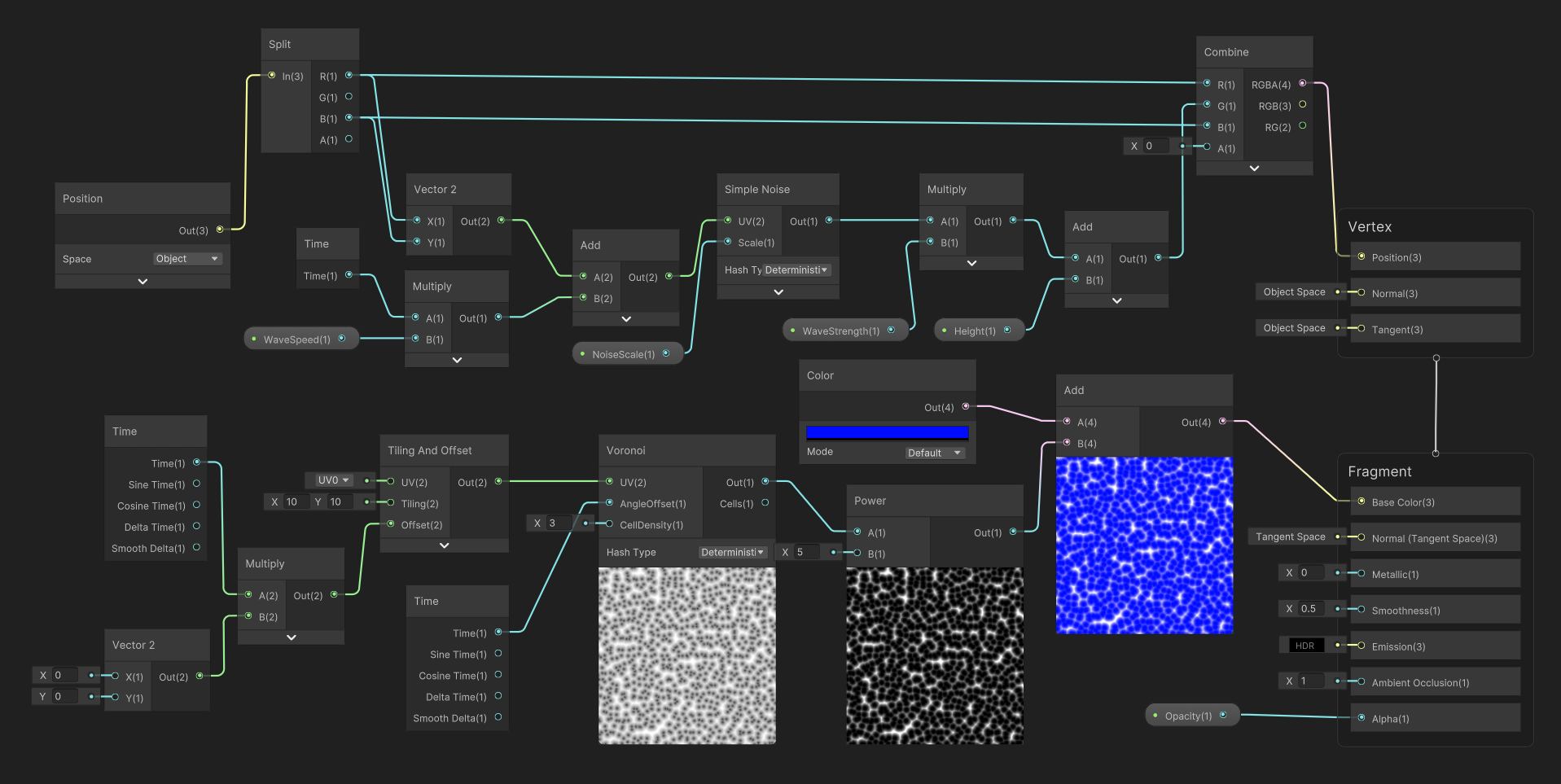
The water surface is built in Shader Graph, with its motion in the vertex stage and its pattern in the fragment stage.
In the vertex stage, the object-space position is split and its X and Z components are offset by time multiplied by WaveSpeed. That scrolling coordinate feeds a Simple Noise node scaled by NoiseScale; the noise is multiplied by WaveStrength, offset by Height, and written back as the vertex Y. The surface rises and falls in slowly travelling waves.
In the fragment stage, a Voronoi node tiled 10 by 10, with a cell density of 3 and its angle offset driven by time, produces cells that shift continuously. Raising the result to the power of 5 keeps only the brightest cell borders, and adding them to a blue base colour draws bright, moving lines across the water. Smoothness is set to 0.5 and transparency comes from an Opacity property.
The water surface in the scene: travelling waves and moving Voronoi lines.
Rest of the scene
- Tree with wind: shader (this one in Shader Graph) that simulates leaf deformation from wind, using temporal noise.
Everything integrates into a playable scene with a custom FPS controller (FPSController, MouseLookFPS), where you can move, shoot, and modify the terrain in real time.
Links
- Repository: pending public release
- Demo video: youtube.com/watch?v=uPAuD5lgHe0